Elena: Snapvine
Elena's Snapvine RSS feed.
This a quick post for a friend of mine, she's asking about how to get a podcast going, as she's been using Snapvine.com, and that's all fine and dandy, it's quick and simple, and one can call into their account to leave a message. A few of my geek trucking friends, and those that like some of us truckers (it's nice that the industry has outside supporters, :) ) have used this service, as another meeting point. Sorta like Twitter but with your voice.
But basicly, what one needs to get their own Cyber Radio, Podcast, Netcast, or what ever name one wants to call it. Off of the ground, they need to have a Blog of some sort that they can post messages to such as this one. OR any other Myriad of bloging tools out there. MySpace and FaceBook I think are out, as they aren't easy to add to an RSS / Podcatcher aggrigator.
I personally like Blogger for a freebie Bloging tool. There are many tools out there that work with it, Next on my list would be a Free WordPress Blog, as that's one of the tools that I'm trying to learn how to use, and it's got many tools to go with it. There are others tools that can be used, and I'm not familiar with them, so I won't talk about them. I did some easy math on that problem. :P Ok, Now that a person has a Blog that is RSS compatable, they need to find a place to host the files. - Unless Blogger lets you UL a file to their site. - ? I don' think that they do. A person could also get a "basic with your own domain name account" via 1and1.com or Godaddy, and they both provide a basic Blog that will host the files for you, for next to nothin' or for the cost of registering a domain through them. - These Blogs and the blogging tools do have some limitations, but they do work, and would be a great place to start and learn "how to." AND, your content is still yours, without giving up the rights to your content and you're not subject to the whims of an outside blogging hosting site.
But for the freebie not ready to comit 20-40 bucks... read on.
Now we've got a Blog that can be easily caught by BashPodder, iTunes, or FeedDeamon or Juice or gPodder or Amarok, or WinAmp.... or... LifeRea or Google Reader.... But we don't have a place to host the files.
File hosting. Box.net Free, and easy enough to link to. I don't use them, and they also hose the file name, but it's free, and if you don't care if your podcast is called 7G8M4.mp3 or VvV41Gg.mp3 or some other odd file name, it'll work for you. I'm picky about that kind of thing, so for me it would be a show stopper. - Or try http://www.oosah.com/ - I had problems with oosah.com with their flash uploader and my Linux machine, but if you're running Window's it ought to work for you just fine. - (I'll be booting up my windows machine sometime this week as there are some windows things that I need to do, and I've not turned on that machine for almost 3 months. Yea, I love my Linux, but I've still got some Windows issues, - I'm seeking therapy, via www.LinuxCranks.info , and other Linux NetCasts... ) But back about oosah.com. They will allow 1 Terrabyte of data of storage online. And it has ITS issues also. :P But for a learning experiance, and the price of your time and effort and being free to use, it's not a bad place to try out.
BUT the Lowcost 1and1.com site will allow you to FTP or create a Wordpress blog. - GoDaddy, as great as they might be, is getting hard to navigate with all of their adds. And thier (GoDaddy) Freebie Blog wouldn't allow me to FTP files to it. So... And they charge you if you want to keep your domain WhoIs info private. So my pick would be 1and1.com and will be my pick to partner with in the future. But back to the topic I was meaning to put into this paragraph. (ok so my 5 min reply to Elena has taken longer, as my mental wheels are rolling and I can't sleep when they do... )
..... to be continued and/or expanded upon....
R_
Wednesday, December 24, 2008


Sunday, November 23, 2008
How to force quit a program in XFCE
how to force quit in XFCE - Ubuntu Forums: "how to force quit in XFCE"
While I was farting around whit XFCE, as I like that it is a lot like Gnome, and that it's a little snappier etc, and that I might want to know more about it if I am to use it on an old machine, or if I just want my machine to have a little different look and feel for a while. Its sorta like cheating on my Gnome Girlfriend, but not worthy of any guilt. So anyway I got to the Ubuntu forums to see what I can find, as XFCE by default doesn't have a Kill Program Icon in the "Add to Panel", er "Customize Panel" list.
I found this entry on the Ubuntu forums:
Thomas Beckett Said:
I always find it easier when you have a gui program to just run the
"xkill" command - the pointer changes to the kill icon - you then
click on your crashed program and its gone
Tom
Ok, that's cool. That works. But what about the next time? I want a darn icon on the panel so that I can click click kill and get.
To get this, I did thus.
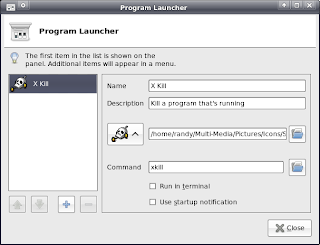
Right Click on the panel > Add Launcher (Program Launcher with Optional Menu) > in the Command box enter in xkill Add a name to this function if you wish, I used X Kill add a description if you wish, and add a Icon if you wish. And Viola! You can now kill rascal programs with a click click and get on with your bad self to the next thing you forgot about to do since you were going to do the first thing that didn't work cuz you had to kill a program and get on with your day.. And also maybe try to figure out why the darned blabeded thing crashed. OR move on to some other less crashy program...
While I was farting around whit XFCE, as I like that it is a lot like Gnome, and that it's a little snappier etc, and that I might want to know more about it if I am to use it on an old machine, or if I just want my machine to have a little different look and feel for a while. Its sorta like cheating on my Gnome Girlfriend, but not worthy of any guilt. So anyway I got to the Ubuntu forums to see what I can find, as XFCE by default doesn't have a Kill Program Icon in the "Add to Panel", er "Customize Panel" list.
I found this entry on the Ubuntu forums:
Thomas Beckett Said:
I always find it easier when you have a gui program to just run the
"xkill" command - the pointer changes to the kill icon - you then
click on your crashed program and its gone
Tom
Ok, that's cool. That works. But what about the next time? I want a darn icon on the panel so that I can click click kill and get.
To get this, I did thus.

Right Click on the panel > Add Launcher (Program Launcher with Optional Menu) > in the Command box enter in xkill Add a name to this function if you wish, I used X Kill add a description if you wish, and add a Icon if you wish. And Viola! You can now kill rascal programs with a click click and get on with your bad self to the next thing you forgot about to do since you were going to do the first thing that didn't work cuz you had to kill a program and get on with your day.. And also maybe try to figure out why the darned blabeded thing crashed. OR move on to some other less crashy program...
Saturday, November 22, 2008
Nativeraving: Creating Animated GIF files with Ubuntu 7.10
Nativeraving: Creating Animated GIF files with Ubuntu 7.10
The section below what what helped me out the most...
Next you need to fire up the GIMP and open the first frame.
Next we need to open all the frames as layers.
To do this we need to go to our first frame and go to the menu:
File>Open as layers
Browse to the folder with all the frames in it and hit CTRL+A
Then hold CTRL and click on your first frame to deselect it and then open the files.
Hit CTRL+L, that will bring up the layers.
To preview your animated image simply go to the picture window then:
Filters>Animation>Playback and hit play.
To help reduce the file size go to:
Filters>Animation>Optimize (for GIF)
All you have to do now is save the image as a GIF and choose to save it as an animation.
The section below what what helped me out the most...
Next you need to fire up the GIMP and open the first frame.
Next we need to open all the frames as layers.
To do this we need to go to our first frame and go to the menu:
File>Open as layers
Browse to the folder with all the frames in it and hit CTRL+A
Then hold CTRL and click on your first frame to deselect it and then open the files.
Hit CTRL+L, that will bring up the layers.
To preview your animated image simply go to the picture window then:
Filters>Animation>Playback and hit play.
To help reduce the file size go to:
Filters>Animation>Optimize (for GIF)
All you have to do now is save the image as a GIF and choose to save it as an animation.
Friday, September 26, 2008
Eseries Blog Archive Alternative Yahoo! Email Access - IMAP
Eseries Blog Archive Alternative Yahoo! Email Access
A little background on IMAP and Yahoo...
I'm playing around with it and hope that it'll get settled. Would love the IMAP email function, without flaws.
A little background on IMAP and Yahoo...
I'm playing around with it and hope that it'll get settled. Would love the IMAP email function, without flaws.
Wednesday, September 10, 2008
Randomized Cast
Randomized Cast
This is a NetCast (no, I don't like the word PodCast as it alludes to the fact that people have to have an iPod or iTunes ) to listen to it. And no. One does not. But 1980's Walkman's are Welcome to listen too, I just won't put it on to a casset tape for them. They're on their own. - I am finding that I have more to yammer on about then I had previously thought. Hmm.. I think that I've got it... Randomized Radio NetCast. Same as my Initials. Whoo hoo.. And I have yet to have my morning coffee. This Calls for a Coffee.. :)
This is a NetCast (no, I don't like the word PodCast as it alludes to the fact that people have to have an iPod or iTunes ) to listen to it. And no. One does not. But 1980's Walkman's are Welcome to listen too, I just won't put it on to a casset tape for them. They're on their own. - I am finding that I have more to yammer on about then I had previously thought. Hmm.. I think that I've got it... Randomized Radio NetCast. Same as my Initials. Whoo hoo.. And I have yet to have my morning coffee. This Calls for a Coffee.. :)
Thursday, September 04, 2008

Subscribe to:
Posts (Atom)
Issues with Linux Mint (or Debian Linux) and Xsane
#notetoself So, today, I was playing around with a new PC setup. And of course there was an issue with the HP Scanner. - I generally use Xsa...
